
Jozu Hub: The Private AI Registry
Jozu Hub is a private registry designed for organizations to store, secure, deploy, and govern their AI and ML projects.
Jozu Hub is primarily used as a self-hosted private install - this keeps your organization's data private (Jozu Hub doesn't call home and Jozu doesn't see any part of your installation from outside). All Jozu Hub features are available in that on-premises version. Most features are available in Jozu Hub SaaS at jozu.ml, but customization and configuration are limited. Both versions of Hub can be used with Jozu Agent Guard.
INFO
Get access to Jozu self-hosted to use the full power of Jozu Hub and pair it with Jozu Agent Guard.
Status Page
The Status page gives a single view of the state of your registry. It shows:
- Models, agents, and MCP servers deployed to your production environment (on-premises only)
- Vulnerabilities across all AI packages in the registry
- License issues across all packages in the registry
- Recent push and pull activity for the signed-in user
The Status page is most powerful in on-premises deployments. There, Hub connects to your production Kubernetes clusters so the page shows what's actually running in production alongside the security and license posture across every package in the registry - all on one screen.
On Jozu SaaS, the security and license panels work the same way and surface real issues across every ModelKit you have visibility into. The "models in production" count is on-prem only and will always be zero on SaaS, since SaaS Hub isn't connected to your runtime environments.
Catalog Page
The Catalog shows a tile for each ModelKit that is stored in Jozu Hub and that the user has visibility to (either because it's in a public repository, or in a private repository the user has access to).
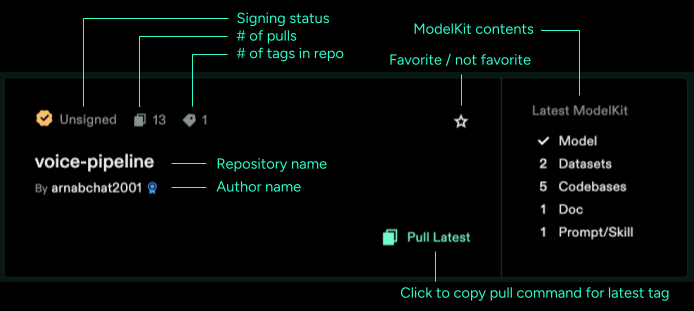
Each tile shows:
- Repository name and author
- Signing status of the latest tag (signed or unsigned)
- Number of pulls and number of tags in the repository
- A contents panel showing the latest ModelKit's composition: counts of Models, Datasets, Codebases, Docs, and Prompts/Skills
- A favorite button (star icon)
- A "Pull Latest" button that copies the
kitpull command to your clipboard (you'll need to install the Kit CLI if you don't already have it).
TIP
Double clicking the Copy Pull Command button will copy only the repository reference URL and omit the Kit CLI command. This is useful if you're using different Kit commands, or using the reference in another context.
Clicking a tile will open up the Repository View.
Search Bar
In the navigation there is a search bar for content in Jozu Hub. Try typing "Fraud" then click on the jozu-quickstarts/fraud-detection repository - we'll use that to explain the Repository View next.
Repositories
The Repositories menu item will give the user a list of repositories that they have access to: both repositories in their private Account, and repositories in Organizations that they have been added to (On-Prem only). This view omits public repositories that are viewable by all users.
See the Repository View page for more details on using this view.
Add Repository
You can add a new empty repository manually, import a repository from Hugging Face, or create a repository automatically by pushing a ModelKit to Jozu Hub. For more information see the Creating Repositories doc page.